From brief to edit
One sentence, and the AI writes the script, picks the shots and assembles a complete short video. No more blank page.
“a reel that sells my product”
CoupAI is the AI video editor that turns a simple brief into a short video ready to publish. Upload your media, describe your idea: AI video editing handles animated titles, transitions, voice-over and synced subtitles. Creating a video with AI has never been this fast.
Private beta — free during the beta · No credit card · HD export
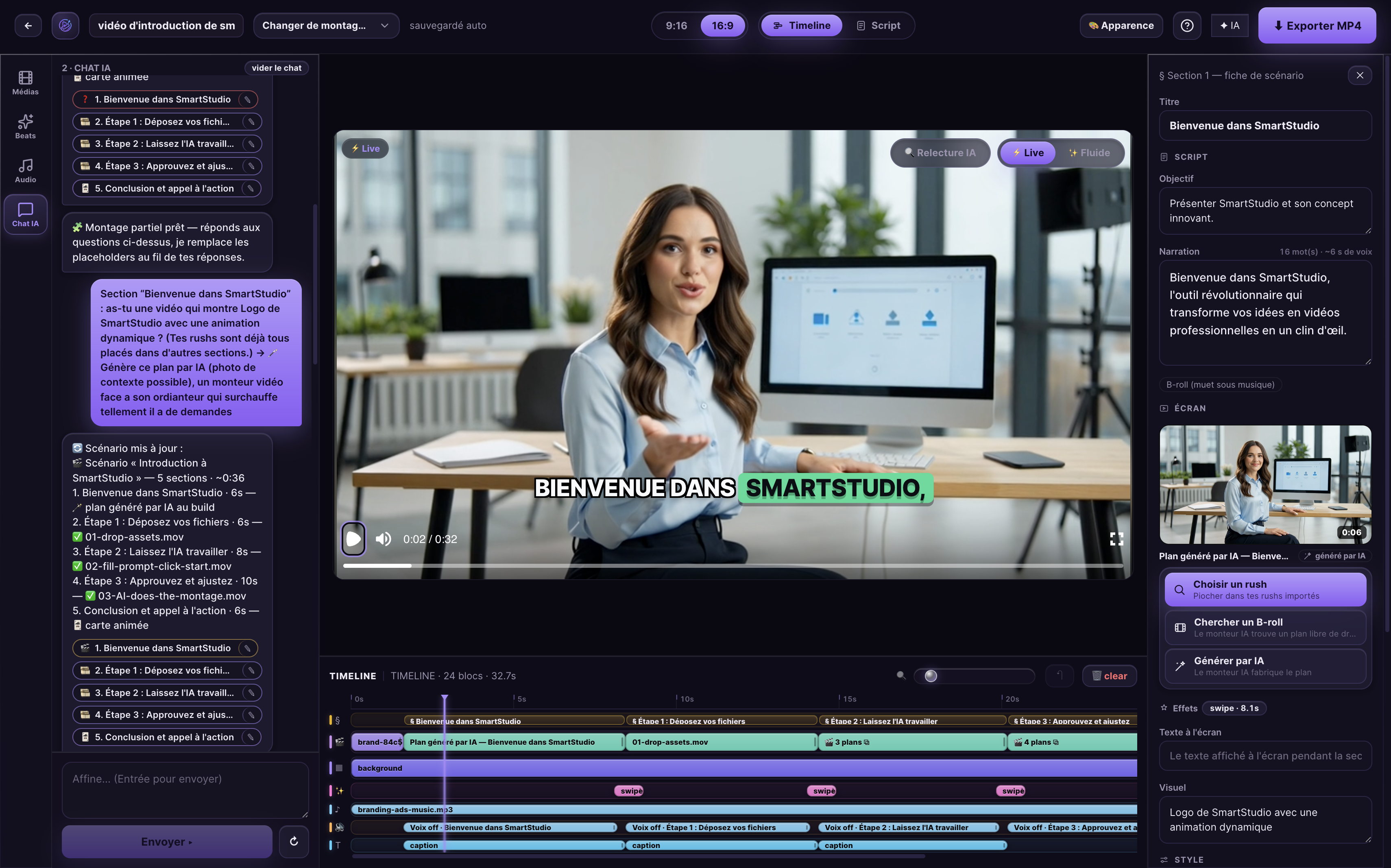
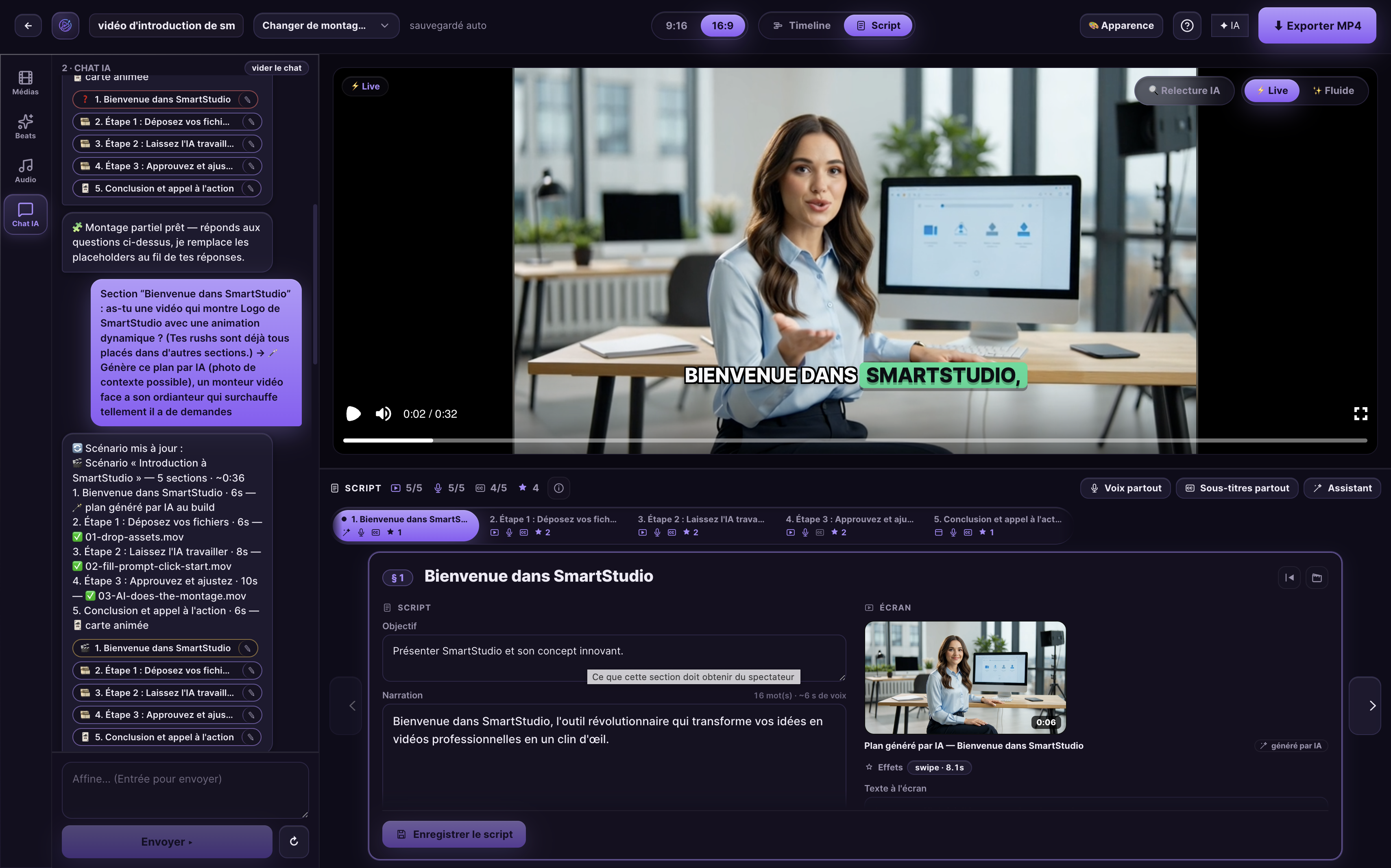
Animated titles, transitions, voice-over, subtitles, music: the AI assembles every piece of a real edit. You just describe the result.
One sentence, and the AI writes the script, picks the shots and assembles a complete short video. No more blank page.
Hooks and punchlines writ large, animated and on-brand. Eyes are caught from the very first second.
Cuts, zooms and fades timed to the voice and the beat — never random.
The same project delivered in 9:16 and 16:9. One production covers TikTok, Reels, Shorts and YouTube.
A track at the right level, cuts aligned to the rhythm. The energy of a real edit.
Your app or website in a generic phone or laptop frame — no brand logos, without leaving the editor.
Generate a natural voice in one click, or import your recording: the edit re-syncs to it automatically.
Synced to the syllable and styled to your brand. 8 out of 10 views happen without sound — stay readable.
No timeline to learn, no software to install. You describe, the AI edits, you refine in the chat. That's it.
Drag in your footage, photos or screenshots — or start from a blank page. One sentence about the angle, length and tone is enough to launch the AI.
Before your eyes, the agent writes the script, lays down the voice-over, subtitles, titles, music and transitions. A complete edit in a few minutes.
“Shorten the intro”, “change the music”: you direct in plain language, in the chat or the script. Every change undoes in one click, then export HD MP4.
Four differences that turn a simple brief into a video people watch to the end — and want to share.
CoupAI writes and generates the voice-over section by section, then locks the edit to it: every shot ends exactly with its sentence. No more trailing silences or off-beat cuts.
Word-by-word karaoke, readable lower third, theme applied automatically from your brand kit. Your videos grab attention from the first second — without you touching a single setting.
For every section, CoupAI picks a clip from your media, finds royalty-free B-roll, or generates the shot with AI when the image doesn't exist yet. Empty screens are over.
Native 9:16 for TikTok, Reels and Shorts — and 16:9 in one click. Thanks to the indexed screenplay, the AI finds any section of an hour-long video and reworks only that one.
The AI finds one section and reworks only that one.
No inflated metrics, no fake reviews: here is how CoupAI works, in numbers — and the editor as it really is, on screen.
from a brief to a reel ready to publish — a typical generation
voice-over + subtitles laid down by default, tweakable in the chat
interface in English, French and Spanish — multilingual briefs
HD MP4 export, no forced logo, ready for social
CoupAI runs on GPT-4o as well as on an open-source model. Plug in your own provider, keep your footage and your data on your side: compliance, without compromising on quality.
The proof is the product: the captures on this page — timeline and script — come from the real editor, not a mockup. And during the private beta, editing your first video is free — the best demo is your own.
Edit your first video — free during the betaSee the editor againFree during the private beta · Pricing announced soon · Your data stays yours
Pricing, watermark, privacy, formats: the answers that matter before editing your first video with CoupAI.
CoupAI is currently in private beta: access is free during this phase, no credit card required. Final pricing will be announced soon — beta testers will be told first, and nothing is ever charged without your explicit consent.
No. No forced logo on your exports. Your edits carry YOUR brand — logo, colors and fonts are yours, applied automatically. You publish a video that is 100% on-brand.
Yes. Your media and projects belong to you and are never used to train a third-party model. CoupAI is multi-provider and sovereign-AI ready: you can route generation to the infrastructure of your choice, according to your privacy and compliance requirements.
No technical skills required. You describe your video in one sentence and add your media: the AI picks the pacing, the cuts, the titles, the transitions and the music. No timeline to learn — you then adjust in plain language.
Yes. Let CoupAI generate a natural AI voice-over, or import your own recording. Either way, the audio syncs automatically to the edit and drives the word-by-word subtitles.
Write your brief in English, French or another language: CoupAI follows. Voice-over and subtitles are generated in all major languages, in your brand's style.
You export HD MP4 in each platform's format: vertical 9:16 for TikTok, Reels and Shorts, and horizontal 16:9 for YouTube. The same edit adapts to your channels, keeping titles, subtitles and voice-over.
You stay in control until the final render. Adjust everything in the chat or the script — cut a word, change the music, shorten a shot — and every AI change undoes in a single click. Nothing is locked in.
Describe your idea, drop in your media, and let the AI deliver a complete short video — titles, voice-over, subtitles and music included. Ready for TikTok, Reels, Shorts and YouTube.
Private beta · Free during the beta · Pricing announced soon